Palo Prisma Browser – Take Back Control

Browsers may be your greatest security vulnerability, and your weakest point of control. In our webinar this week, Palo Alto Networks presented the solution – the Prisma Browser – specifically built for security in the era of Agentic AI.

Request Webinar or Demo

A breakthrough in secure access

The browser is where 85% of most workers’ day is spent and yet it’s been one of the hardest attack surfaces to secure. Until now.

You need your people to work seamlessly with cloud-based apps, but you may not have have visibility over what they are doing. You’re happy for them to use Agentic AI to shortcut workflows and creativity, but you don’t want them inadvertently sharing sensitive corporate information with Large Language Models or unauthorised people outside your organisation. Allowing bring your own devices (BYOD) means faster onboarding with interfaces that suit each individual, but each device represents a potential vulnerability for your security posture.

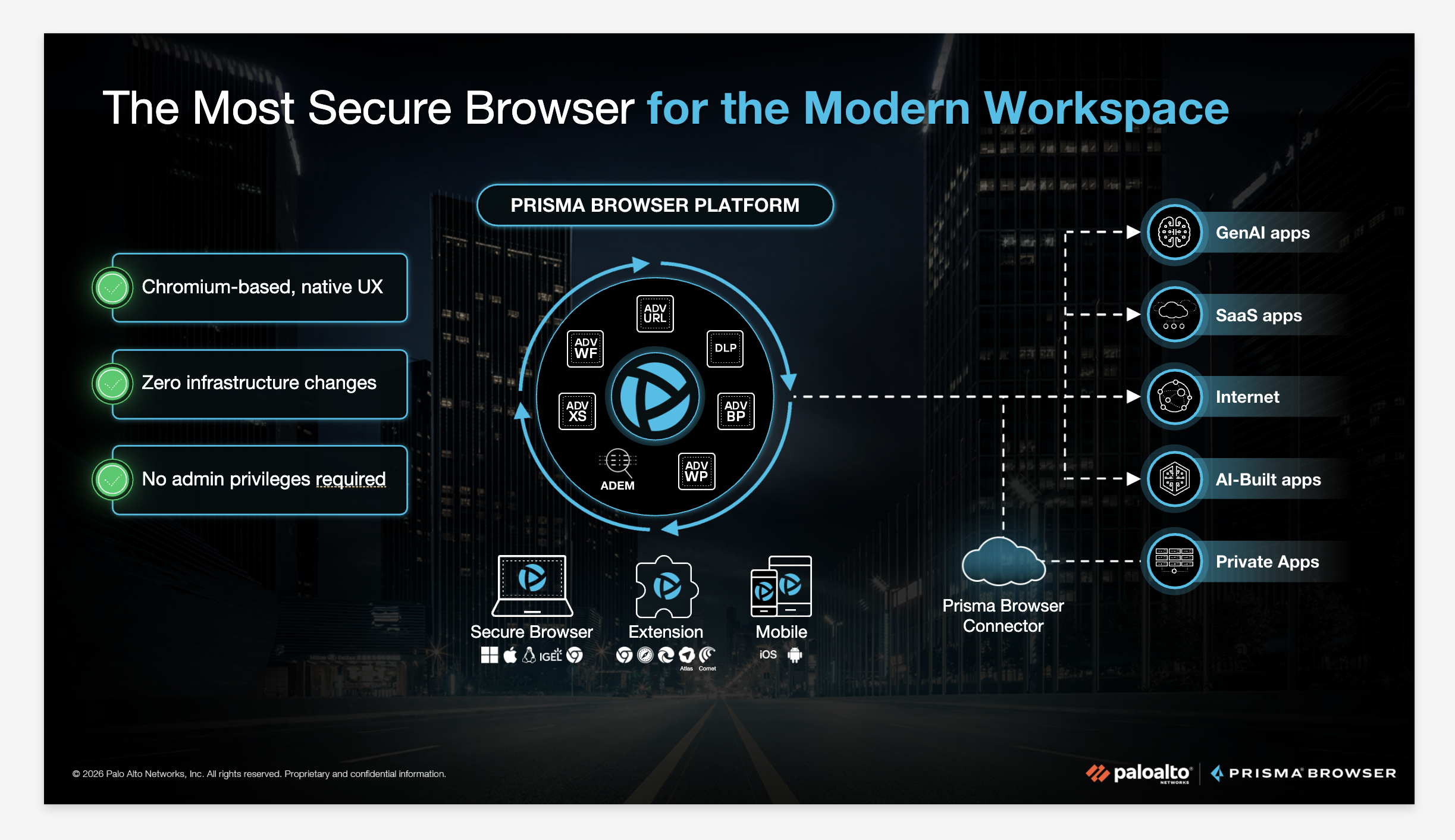
Palo Alto’s Prisma Browser Platform addresses these issues and more, with no need for infrastructure changes or VPNs, targeting three core areas.

 

Why should we be concerned?

Cyber Security icon

Web Security Vulnerabilities

Browsers have become the primary workspace for users, making them a major attack surface. 95% of organisations experienced a security incident originating in the browser in 2024.

Network & Connectivity Icon

Visibility and Data Leakage

Organisations struggle to monitor encrypted web traffic and user actions within browsers, especially with the rise of Gen AI and SaaS applications, and the risk of sensitive data leaking into tools like ChatGPT or personal cloud storage.

Unmanaged Devices and BYOD Risks

Around 90% of ransomware attacks originate from unmanaged devices. Nine out of ten organisations enable some level of access from unmanaged devices for employees, contractors and authorised third parties.

A secure browser, purpose built for enterprise

Prisma Browser is the industry’s first SASE-native secure browser. It embeds advanced security mechanisms directly into a familiar Chromium-based browser to provide safe access to SaaS, web, and private applications – without requiring admin privileges to install. 

A simple solution with far-reaching benefits, Prisma Browser delivers:

  • Secure BYOD & Contractor Access: Grant instant, secure access to sensitive apps for staff, contractors, and third-party partners without shipping laptops or relying on clunky, expensive VDIs. 
  • Safe GenAI Adoption: Gain granular visibility into AI usage and enforce last-mile data controls (like blocking copy/paste or file uploads) to prevent sensitive data from leaking into public AI models. 
  • Extend Zero Trust to the Last Mile: Apply consistent Zero Trust enforcement across both managed and unmanaged devices with real-time monitoring and policy enforcement. 
  • Built-in Threat Prevention: Browse bravely with native threat isolation, phishing protection, and AI-powered threat detection built directly into the workspace. 
  • Simplified Operations: Reduce operational risk and IT complexity with centralised policy control in the cloud—eliminating the need for VPNs or complex agents. 
Prisma Browser Caption here if needed

Watch the webinar recording

This lively one-hour webinar included an excellent demonstration from Palo’s Zak Rieker and Chris Robins showing:

  • how Prisma Browser works,
  • the simplicity of installation and roll-out
  • back-end capabilities for alerts, intervention, reporting and analysis.​

If you would like to watch the webinar or request a one-to-one demo of your own, use the button below.

Request Webinar or Demo

Free browser risk assessment

If you would like to understand the threats your organisation faces, we’re offering a complimentary assessment using the Prisma Browser Extension (PBX). We’ll provide you with a customised Executive Snapshot that reveals exactly where your risk lives, including:

  • Shadow IT Discovery: SaaS apps being accessed outside your corporate SSO.
  • Data Movement: Tracking sensitive data leaving via personal WhatsApp, Gmail, or GenAI tools.
  • The “Forensic Ten Minutes”: A deep-dive timeline of what users actually do around a malicious event.

If you would like to request a free risk assessment, please do get in touch.

Request Risk Assessment